Full lab · 14 missions · about 75 minutes
AI agents: the full lab
In the video, I build an AI agent one part at a time, for the Friday payment run of a small grocery store: one call to a model, two tools, a loop of twelve lines, then helpers, saved steps, a person who signs, memory, a policy and a second agent. Here, you run every part yourself, on your own computer, and open what the agent really sends.
Short on time? Start with the 15-minute exercise: kill the agent in the middle of its run, and watch it carry on.
The full lab for my video How AI Agents Actually Work: Build One From Scratch
The diagram from the video: the part each mission adds around the loop
mission 2
mission 6
mission 7
mission 8
mission 9
mission 10
mission 11
mission 12
mission 13
Before you start
You need Git and Docker (start Docker Desktop first, or the Docker service on Linux) and about 4 GB of free disk space. Nothing else: no Python on your computer, no account and no key. Run the commands in a terminal: Terminal on a Mac, your shell on Linux, and on Windows a WSL terminal, such as Ubuntu, with Docker Desktop's WSL integration turned on. On Linux, add your user to the docker group first, as Docker's install guide shows: the script that kills the agent in mission 8 runs docker itself.
The model here is the scripted stand-in from the video's long runs: a few rules in a container, not a real model. It gets what a model gets, the messages and the tools on offer, and answers in the same format, so the agent's code can't tell the difference. That's why you need no account and no key, and why you get the video's numbers. It proves how the parts are wired: what the agent sends, what gets saved, what happens after a crash. It proves nothing about how a real model behaves.
Did the exercise first? Run its clean-up step before you start: it removes the lab's containers, its data and the tutorials folder, so you start from nothing. Then get the lab from my tutorials repository on GitHub, and start it:
git clone --depth 1 --branch main https://github.com/antonputra/tutorials.git
cd tutorials/lessons/285/lab
docker compose up -d --build --wait
The first start builds the lab's image: it downloads Python, Postgres with pgvector, and the Python packages, LangChain, LangGraph and Deep Agents among them, so give it a few minutes. When the command returns, everything is ready:
postgres: PostgreSQL with three databases:juniper, the store's business data,receiving, the warehouse's, andagent, the agent's own.fake-model: the scripted model. It speaks the same Chat Completions API as a hosted model, and writes every request it gets to a file, so you can open them.receiving-agent: the warehouse's agent, for mission 12.payables-agent: our agent as a service, for mission 13.lab: where the agent runs.docker compose exec -T labin front of a command runs it there. No port is published.
The data is the video's: Juniper Market, a grocery store in Bend, Oregon, and 40 supplier invoices, numbers 1031 to 1070, all due on Friday, November 27, 2026. Look at it:
docker compose exec -T postgres psql -U postgres -d juniper < sql/counts.sql
docker compose exec -T lab python -m tools.world
   table_name    | count
-----------------+-------
 suppliers       |    12
 purchase_orders |    38
 po_lines        |   269
 invoices        |    40
 invoice_lines   |   280
 payments        |     0
 holds           |     0
 access_log      |     0
...
 invoices | first | last |    due     | suppliers | total_usd | characters_of_paper
----------+-------+------+------------+-----------+-----------+---------------------
       40 |  1031 | 1070 | 2026-11-27 |        12 | 169685.00 |              138456
...
PO-2220 PP-101 Receipt paper rolls (case of 50): ordered 20, arrived 12, invoice 1055 bills 20
lines where the quantity that arrived equals the quantity ordered: 268
PO-2207 CP-101: ordered 50, arrived 50, invoice 1042 bills 55
40 invoices from 12 suppliers, $169,685.00 in all, with 138,456 characters of paper invoices. You'll meet two of them early: invoice 1042 bills 55 cases of paper cups where 50 were ordered, and invoice 1055 bills 20 cases of receipt paper where 12 arrived.
How to read the missions:
- Run every command from the lab's folder, where
cdput you, and run the missions in order: later missions use tables that earlier ones create. - Paste each block whole, with its copy button, and press Enter.
- Your times, IDs and a few sizes will differ from the ones on this page. The numbers of requests, payments and dollars are the video's: the scripted model always gives the same answers.
- A dollar figure here is never a bill: both of the lab's models are free. It says what the same tokens would cost at one hosted model's public list price, in
price-list.json. ...in an output stands for what I left out: lines, or the end of a long line.
Mission 1. One call
3 minutes
You send one request to the model, with no tools, and read what goes over the wire and what comes back.
-
agent_by_hand.pyis the agent from the start of the video: one file, with nothing but Python's standard library. Send its first request. The first line gives the scripted model a new, empty log for this run,/logs/s2-one:docker compose exec -T lab python -m app.control s2-one docker compose exec -T lab python agent_by_hand.py one[scripted model: request log /logs/s2-one, 0 ms before each reply] POST http://fake-model:8080/v1/chat/completions { "model": "scripted-1", "messages": [ { "role": "system", "content": "You are the payables agent of Juniper Market, a grocery store in Bend, Oregon. You check supplier invoices against purchase orders." }, { "role": "user", "content": "Is invoice 1042 from Cascade Packaging correct? Check it against its purchase order." } ] } reply: ... "content": "[scripted reply] I cannot see invoice 1042. No tool was offered, so I have no way to read it. A real model may answer anyway, and it would be guessing." ... "usage": { "prompt_tokens": 55, "completion_tokens": 40, "total_tokens": 95 }, ...The request is the model's name and the conversation so far: two messages. The first says who the model is, 131 characters, and the second is our question about invoice 1042. The reply is text, and
usagecounts the tokens in and out. A token is a piece of a word, and it's what a hosted model bills for. -
How big is that request? Measure it as the agent sends it:
POST http://fake-model:8080/v1/chat/completions
the request body is 320 bytes, sha256 93cb93a4ca497d6b...
measured as the bytes agent_by_hand.call_model gives to urllib for this request: json.dumps of the model's
name and the two messages, encoded as UTF-8. The call was stopped there: nothing was sent to a model.
model name 'scripted-1': 10 characters; first message 131 characters; second message 84 characters
...
320 bytes. Nothing is sent this time: the tool stops the call before it leaves.
-
In the video, the free local model counted 59 tokens in and 350 out for this request. Price them at the list:
priced at: gpt-6-luna list price (OpenAI, read 2026-11-21): $0.10 in, $0.50 out per 1M tokens. The model that answered is free.
     59 tokens in   $0.0000059
    350 tokens out  $0.000175
this call            $0.0001809, which is 0.01809 cents: about 1/55 of a cent
The bill starts.
Why. A language model only continues text. It was trained, and then it stopped learning, so it has never seen Juniper Market's invoices. It can't look anything up, and nothing stays in it between two requests: everything it knows about our job is in the request we send.
Mission 2. Tools: the model asks, our code acts
3 minutes
You offer the model two tools, read an invoice and read a purchase order, and see what it does with them.
-
Send the same question with the two tools' descriptions in the request:
docker compose exec -T lab python -m app.control s2-offer
docker compose exec -T lab python agent_by_hand.py offer
docker compose exec -T lab python -m tools.reqlog ls s2-offer
... "tools": [ { "type": "function", "function": { "name": "get_invoice", "description": "Get one supplier invoice: supplier, purchase order number, lines, total and the text of the paper invoice.", "parameters": { "type": "object", "properties": { "invoice_number": { "type": "integer" ... reply: ... "tool_calls": [ { "id": "call_0001", "type": "function", "function": { "name": "get_invoice", "arguments": "{\"invoice_number\": 1042}" } } ] }, "finish_reason": "tool_calls" ... seq received (UTC) bytes msgs tools last message -> reply 1 18:31:35.870 934 2 2 user: Is invoice 1042 from Cascade Packaging corr... -> get_invoice({"invoice_number": 1042})The request grows from 320 bytes to 934: the same two messages, and a
toolslist with the name, the description and the arguments of each function. The reply is not an answer. It's an ask:get_invoicewith{"invoice_number": 1042}, and the reply's reason for ending,finish_reason, istool_calls. -
Did anything run? Every tool writes a row to the store's access log:
docker compose exec -T postgres psql -U postgres -d juniper -c "select count(*) as tool_calls_that_ran from access_log"Nothing ran. The model asked. It can't run anything: that's our code's job.
Why. A tool is a function of ours that we describe to the model. The model only writes the name and the arguments. Our code decides whether to run it, runs it, and adds the result to the list as one more message.
Mission 3. The loop
4 minutes
You run the agent: the loop that keeps doing what you did by hand in mission 2.
-
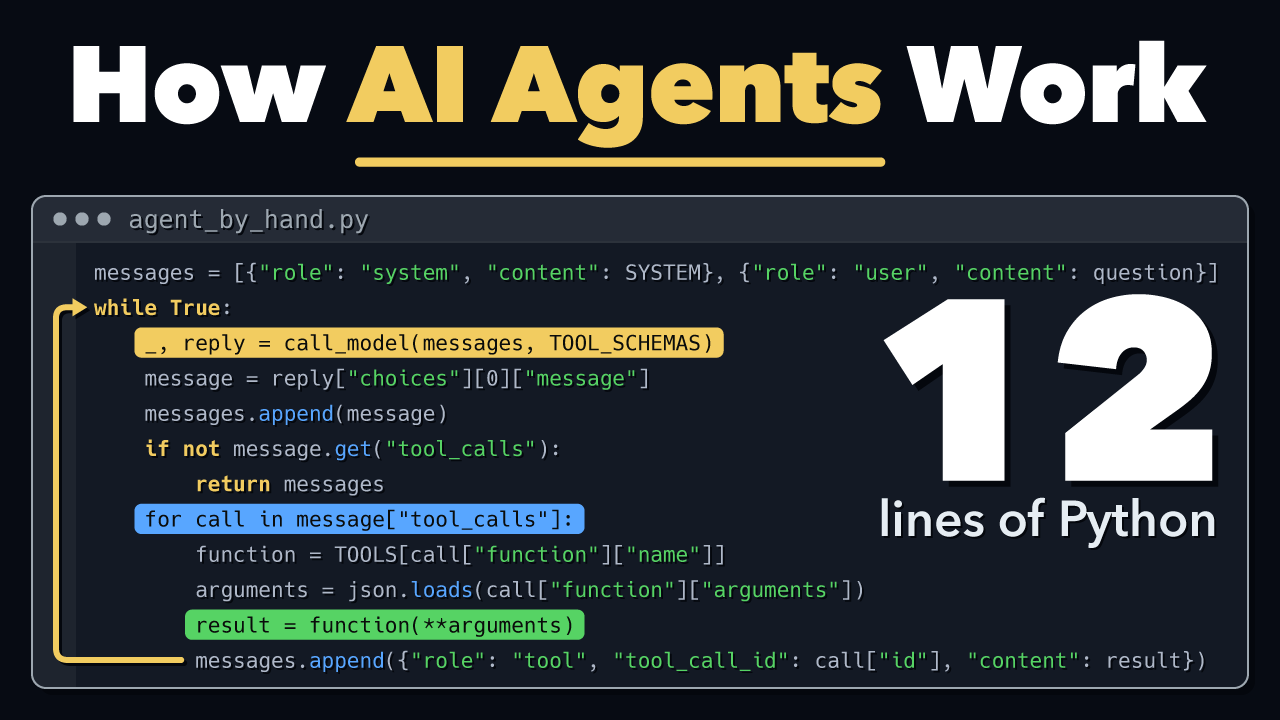
Here are the twelve lines, from the thumbnail of the video:
    messages = [{"role": "system", "content": SYSTEM}, {"role": "user", "content": question}]
    while True:
        _, reply = call_model(messages, TOOL_SCHEMAS)
        message = reply["choices"][0]["message"]
        messages.append(message)
        if not message.get("tool_calls"):
            return messages
        for call in message["tool_calls"]:
            function = TOOLS[call["function"]["name"]]
            arguments = json.loads(call["function"]["arguments"])
            result = function(**arguments)
            messages.append({"role": "tool", "tool_call_id": call["id"], "content": result})
While the reply asks for a tool, run it, add the result to the list, and send the list again. When the reply asks for nothing, return.
-
Ask about invoice 1042 again, this time with the loop:
docker compose exec -T lab python -m app.control s2-loop
docker compose exec -T lab python agent_by_hand.py loop
[scripted model: request log /logs/s2-loop, 0 ms before each reply] system You are the payables agent of Juniper Market, a grocery store in Bend, Oregon. You check supplier invoices against purchase orders. user Is invoice 1042 from Cascade Packaging correct? Check it against its purchase order. model asks get_invoice({"invoice_number": 1042}) we answer 4,302 characters: {"invoice_number": 1042, "supplier": "Cascade Packaging", "po_number": "PO-2207", "invoice_date": "2026-10-28"... model asks get_purchase_order({"po_number": "PO-2207"}) we answer 780 characters: {"po_number": "PO-2207", "supplier": "Cascade Packaging", "order_date": "2026-10-18", "status": "received", "l... assistant Invoice 1042 from Cascade Packaging does not match PO-2207: it bills 55 cases of 12 oz paper cups (case of 1,000) at $38.00; PO-2207 ordered 50: overbilled by $190.00; freight line of $60.00 is not on PO-2207. 3 requests to the model, 2 tool calls run by our codeThe model asks for the invoice, then for the purchase order, then answers from real data: the invoice bills 55 cases of paper cups where the order has 50, $190.00 too much, and a $60.00 freight line that is on no purchase order.
-
Now each request, as the model received it:
docker compose exec -T lab python -m tools.reqlog ls s2-loop
docker compose exec -T postgres psql -U postgres -d juniper -c "select id, actor, action, args from access_log order by id"
seq received (UTC) bytes msgs tools last message -> reply 1 18:31:36.710 934 2 2 user: Is invoice 1042 from Cascade Packaging corr... -> get_invoice({"invoice_number": 1042}) 2 18:31:36.716 5,673 4 2 tool: {"invoice_number": 1042, "supplier": "Casca... -> get_purchase_order({"po_number": "PO-2207"}) 3 18:31:36.720 6,811 6 2 tool: {"po_number": "PO-2207", "supplier": "Casca... -> text: Invoice 1042 from Cascade Packaging does not match PO-2207: it bills 55 cases of 12 oz ... id | actor | action | args ----+----------------+--------------------+-------------------------- 1 | payables-agent | get_invoice | {"invoice_number": 1042} 2 | payables-agent | get_purchase_order | {"po_number": "PO-2207"} (2 rows)934 bytes, then 5,673, then 6,811: each request carries the whole list so far. And two rows in the access log, one for each tool our code ran.
Why. This is an agent: a model that chooses the next step, and a loop of ours that runs it. The loop ends when the model stops asking, whether the job is done or not. The whole file is 90 lines.
Mission 4. The same agent from standard parts
4 minutes
You build the same agent with LangChain: a model named in one line, tools made from ordinary functions, and the loop as one call.
-
Run it with the same question:
docker compose exec -T lab python -m app.control s3-lc
docker compose exec -T lab python agent_langchain.py
docker compose exec -T lab python -m tools.reqlog ls s3-lc
... 3 requests to the model, 2 tool calls run by our code seq received (UTC) bytes msgs tools last message -> reply 1 18:31:38.008 906 2 2 user: Is invoice 1042 from Cascade Packaging corr... -> get_invoice({"invoice_number": 1042}) 2 18:31:38.020 5,625 4 2 tool: {"invoice_number": 1042, "supplier": "Casca... -> get_purchase_order({"po_number": "PO-2207"}) 3 18:31:38.069 6,743 6 2 tool: {"po_number": "PO-2207", "supplier": "Casca... -> text: Invoice 1042 from Cascade Packaging does not match PO-2207: it bills 55 cases of 12 oz ...The same 3 requests and 2 tool calls. The first request is 906 bytes, where ours was 934: LangChain writes the tools' descriptions a little shorter.
-
Where does a tool's description come from? From the function's name, its type hints and its docstring, the text in triple quotes under the
defline. See what the model was shown: -
Compare the two agents, line for line:
Why. Our 90 lines speak one provider's format, and we wrote each tool's description by hand. The standard parts do the same job, and changing the provider is changing one line. From here on, they run the loop.
In the video I also turn on a trace in LangSmith, a hosted service with a free plan. The lab runs without it; README.md in the lab's folder shows how to turn it on with a key of your own.
Mission 5. The long job
4 minutes
You give the same agent the real job: the Friday payment run, 40 invoices, in one conversation.
-
Three more tools: list the invoices that are due, schedule a payment, and put an invoice on hold. Start the run on an empty payments table:
docker compose exec -T lab python -m seed.seed --reset-activity
docker compose exec -T lab python agent_langchain.py run
activity reset: payments, holds and access_log are empty; every invoice is open [scripted model: request log /logs/s3-run, 0 ms before each reply] 120 requests to the model, 119 tool calls run by our code, 240 messages in the conversation Payment run for invoices due 2026-11-27: 40 invoices checked. Scheduled 33 payments, $151,275.00 in total. Put 7 invoices on hold: - 1034: freight line of $45.00 is not on PO-2199 - 1042: it bills 55 cases of 12 oz paper cups (case of 1,000) at $38.00; PO-2207 ordered 50: overbilled by $190.00; freight line of $60.00 is not on PO-2207 - 1049: unit price $39.75 for Strawberry jam, 10 oz (case of 12); PO-2214 says $39.00: overbilled by $6.00 - 1051: freight line of $75.00 is not on PO-2216 - 1058: duplicate of invoice 1037: same supplier, PO-2202 and $2,884.00 - 1063: no purchase order for a total of $2,008.00 - 1066: freight line of $52.50 is not on PO-223133 payments, $151,275.00, and 7 invoices on hold. Four of the holds are Cascade Packaging's freight lines, because nobody told the agent the freight is agreed.
-
Now the size of the requests:
docker compose exec -T lab python -m tools.reqlog ls s3-run | tail -3
docker compose exec -T lab python -m tools.reqlog sizes s3-run | tail -1
118 18:31:52.686 294,937 236 5 tool: {"invoice_number": 1070, "supplier": "Harbo... -> get_purchase_order({"po_number": "PO-2235"}) 119 18:31:52.781 296,030 238 5 tool: {"po_number": "PO-2235", "supplier": "Harbo... -> schedule_payment({"invoice_number": 1070, "amount_usd": 4960.0, "note": "Harbor Light Seafood, PO-2235"}) 120 18:31:52.906 296,455 240 5 tool: {"payment_id": 33, "invoice_number": 1070, ... -> text: Payment run for invoices due 2026-11-27: 40 invoices checked. Scheduled 33 payments, $1... requests 120, first 1,985 bytes, largest 296,455 bytes, all together 18,291,208 bytesThe first request was 1,985 bytes, the last 296,455. All together 18.3 million bytes, for papers that are 138,456 characters.
-
And in tokens and dollars, at the list price:
...
request  sent by                  bytes  tokens in  tokens out       dollars
      1  our agent                1,985        499          16    $0.0000579
      2  our agent                8,134      2,300          10     $0.000235
...
    119  our agent              296,030     79,663          35    $0.0079838
    120  our agent              296,455     79,750         249    $0.0080995

our agent: 120 requests, 18,291,208 bytes, 4,934,205 tokens in, 2,598 tokens out, $0.4947195; its largest request is 79,750 tokens
...
The first request is 499 tokens, the last 79,750, and the run is about $0.49: almost all of it is input, the list sent again and again.
Why. Every request carries everything before it, so the list only grows, and each request costs more than the one before. The list is doing two jobs: it's the model's working page, and it's where everything is kept. A model's context window, the most a request can hold, puts a limit on it.
Mission 6. A workspace
5 minutes
You switch on Deep Agents: the same loop, with the parts a long job needs. First, the workspace.
-
A bare deep agent, with our two tools and the same question:
docker compose exec -T lab python steps.py s4-bare
docker compose exec -T lab python -m tools.reqlog tools s4-bare 1
docker compose exec -T lab python -m tools.reqlog sizes s4-bare | tail -1
... 3 requests to the model, 2 tool calls request 1 offers 10 tools: - ls(path) - read_file(file_path, offset, limit) - write_file(file_path, content) - edit_file(file_path, old_string, new_string, replace_all) - delete(file_path) - glob(pattern, path) - grep(pattern, path, glob, output_mode, max_count) - task(description, subagent_type) - get_invoice(invoice_number) - get_purchase_order(po_number) requests 3, first 11,160 bytes, largest 17,003 bytes, all together 44,045 bytesThe model is now offered 10 tools: our two, seven for files and one named
task. Our instructions are untouched. The first request is 11,160 bytes where it was 906: every tool description is sent every time. -
The agent writes its finding to a file. Where does the file live?
docker compose exec -T lab python steps.py s4-write
docker compose exec -T lab python steps.py s4-disk
... model asks write_file({'file_path': '/findings/1042.md', 'content': 'Invoice 1042 from Cascade Packaging does not match PO-2207: it bills 55 cases of 12 oz pap...'}) we answer 30 characters: Updated file /findings/1042.md... ... state keys: ['files', 'messages'] files in the state: 1 /findings/1042.md 210 characters, encoding utf-8, created 2026-11-24T18:31:58.437463+00:00 ... state keys: ['messages']By default, the file lives with the run, in the agent's state, not on a disk: the state has a
fileskey. With another backend, the part that decides where files live, the same file tools write to a real folder,/workspace, and the state has nofiles. -
One tool result too large for the page:
...
model asks   list_invoices_due({'due_date': '2026-11-27', 'include_documents': True})
we answer    1,594 characters: Tool result too large, the result of this tool call call_0001 was saved in the filesystem at this path: /large...
model asks   read_file({'file_path': '/large_tool_results/call_0001', 'offset': 0, 'limit': 5})
...
files in the state: 1
  /large_tool_results/call_0001  146,606 characters, encoding utf-8, created 2026-11-24T18:32:01.526255+00:00
...
The tool returns 146,606 characters, every paper of the 40 invoices. The model sees a note of 1,594 characters with a preview, and the full result goes to a file it can read in parts.
Why. A workspace keeps things out of the list. It makes each request larger before it makes anything smaller: the same 40 invoices are 19.5 million bytes on this agent.
Mission 7. Helpers
5 minutes
You give each invoice to a helper, which the library calls a subagent: the same loop again, on a clean page, for one task.
-
The payment run on the deep agent, in one conversation:
docker compose exec -T lab python -m seed.seed --reset-activity
docker compose exec -T lab python steps.py s8-direct direct-1
docker compose exec -T lab python -m tools.reqlog sizes s8-direct-1 | tail -1
... Scheduled 33 payments, $151,275.00 in total. ... requests 120, first 12,239 bytes, largest 306,709 bytes, all together 19,521,688 bytes120 requests, 19.5 million bytes.
-
The same run, with each invoice handed to a helper with
task:docker compose exec -T lab python -m seed.seed --reset-activity docker compose exec -T lab python steps.py s8-delegate delegate-1 docker compose exec -T lab python -m tools.reqlog split s8-delegate-1... Scheduled 33 payments, $151,275.00 in total. Put 7 invoices on hold: ... 82 requests, smallest 12,384, largest 53,091, all together 2,918,606 bytes | system prompt starts: You are the payables agent of Juniper Market, a grocery store in Be... 119 requests, smallest 9,402, largest 18,620, all together 1,601,411 bytes | system prompt starts: You check one supplier invoice for Juniper Market. Read the invoice...201 requests, where there were 120, but 4.5 million bytes. Our agent sent 82 of them, and its largest is 53,091 bytes, about a sixth of what it was. The 40 helpers sent 119. The same result: 33 payments and 7 holds.
-
What a helper gets, and what comes back:
docker compose exec -T lab python -m tools.reqlog messages s8-delegate-1 3 --max 260
docker compose exec -T lab python -m tools.price log s8-delegate-1
request 3: model scripted-1, 9,402 bytes, 2 messages, 9 tools [0] system (243 characters) 'You check one supplier invoice for Juniper Market. Read the invoice and its purchase order with your tools and compare every line. Reply with one line: PAY <invoice number> <amount> <short note>, or HOLD <invoice number> <reason>. [1] user (146 characters) 'Check invoice 1031 against its purchase order. Reply with one line: PAY <invoice number> <amount> <short note>, or HOLD <invoice number> <reason>.' ... our agent: 82 requests, 2,918,606 bytes, 659,675 tokens in, 3,784 tokens out, $0.0678595; its largest request is 11,359 tokens a helper: 119 requests, 1,601,411 bytes, 405,297 tokens in, 1,693 tokens out, $0.0413762; its largest request is 4,920 tokens all 201 requests: 4,520,017 bytes, 1,064,972 tokens in, 5,477 tokens out, $0.1092357 ...Its own short instructions and the task, and nothing of our list: 9 tools, all but
task. One line comes back, likePAY 1031 2655.00 Blue Heron Dairy, PO-2196. In dollars: about $0.11 for 201 requests, against $0.49 for 120 in mission 5.
Why. More calls, each far smaller. A helper shares our files, not our list, and it can't start helpers of its own: it isn't offered task. It's a trade, not a free win.
Mission 8. A crash, and a payment scheduled twice
12 minutes
So far, the whole run lives in one process's memory. You kill it in the middle of invoice 23 three times: with nothing saved, with a list saved by hand, and with every step saved. Then once more at the worst moment, inside the payment tool.
-
Nothing saved. Start the run in a container of its own, with the model slowed down to half a second a reply, and kill it at the model's 114th request, in the middle of invoice 23:
docker compose exec -T lab python -m seed.seed --reset-activity
docker compose exec -T lab python -m app.control s5-nosave-first
docker compose run -d --name payrun-n lab python steps.py s5-nosave first 500 helpers
tools/kill-when.sh payrun-n 114 'docker exec juniper-lab-fake-model-1 sh -c "ls /logs/s5-nosave-first 2>/dev/null | grep -c request; true"'
docker rm payrun-n
activity reset: payments, holds and access_log are empty; every invoice is open [scripted model: request log /logs/s5-nosave-first, 0 ms before each reply] 96ae43b62670ab3a712ef1aeb6bf2e428f4eba6967c5384a00a1c311213d67ad 18:53:20 count is 114: docker kill payrun-n container /payrun-n: exited, exit code 137, finished 2026-11-24T18:53:20.573966325Z payrun-nkill-when.shcounts the requests in the scripted model's log, withdocker exec, quicker thandocker compose exec. At 114, about a minute in, it kills the container with SIGKILL, exit code 137: a crash, not a clean stop. The last line removes the stopped container. Look at the payments, then start it again:docker compose exec -T postgres psql -U postgres -d juniper < sql/payments.sql docker compose exec -T lab python steps.py s5-nosave again 0 helpers docker compose exec -T postgres psql -U postgres -d juniper < sql/payments.sqlpayments | invoices | total_usd ----------+----------+----------- 18 | 18 | 81306.50 ... no checkpointer: nothing of this run is saved outside this process ... payments | invoices | total_usd ----------+----------+----------- 51 | 33 | 232581.50 (1 row) invoice_number | payments | total_usd ----------------+----------+----------- 1031 | 2 | 5310.00 1032 | 2 | 6280.00 ... 1052 | 2 | 8420.00 (18 rows)18 payments when it died. Started again, it begins at invoice 1031 and ends with 51 payments for 33 invoices: $232,581.50 where $151,275.00 was due. The list it got said which invoices were already scheduled; the scripted model doesn't look.
-
A list saved by hand.
agent_by_hand_saved.pyis the loop from mission 3, with all five tools and nine lines of ours that save the whole list to one row in Postgres after every turn, and read it back at the start:# --- save and load start def load(run): with psycopg.connect(DB) as db: db.execute("CREATE TABLE IF NOT EXISTS lists (run text PRIMARY KEY, messages jsonb NOT NULL, saves integer NOT NULL)") row = db.execute("SELECT messages FROM lists WHERE run = %s", (run,)).fetchone() return row[0] if row else None def save(run, messages): with psycopg.connect(DB) as db: db.execute("INSERT INTO lists VALUES (%s, %s, 1) ON CONFLICT (run) DO UPDATE" " SET messages = EXCLUDED.messages, saves = lists.saves + 1", (run, json.dumps(messages))) # --- save and load endKill it in the middle of invoice 23, at its 69th request, then start it again under the same name:
docker compose exec -T lab python -m seed.seed --reset-activity
docker compose exec -T lab python -m app.control s2-saved-friday-h
docker compose run -d --name payrun-h lab python agent_by_hand_saved.py friday-h 500
tools/kill-when.sh payrun-h 69 'docker exec juniper-lab-fake-model-1 sh -c "ls /logs/s2-saved-friday-h 2>/dev/null | grep -c request; true"'
docker rm payrun-h
docker compose exec -T lab python agent_by_hand_saved.py friday-h
docker compose exec -T postgres psql -U postgres -d juniper < sql/payments.sql
... 18:54:15 count is 69: docker kill payrun-h container /payrun-h: exited, exit code 137, finished 2026-11-24T18:54:15.777249984Z payrun-h [scripted model: request log /logs/s2-saved-friday-h, 0 ms before each reply] run friday-h: 138 messages read back from Postgres, carrying on 120 replies from the model in the list, 119 tool results, 241 messages ... payments | invoices | total_usd ----------+----------+----------- 33 | 33 | 151275.00 ..."138 messages read back from Postgres, carrying on", and 33 payments for 33 invoices. Our lines save the list, not the place: a kill inside a turn repeats the whole turn. And they keep one list, where each helper has its own.
-
Saved steps. LangChain's loop is a small graph, run by a library called LangGraph, which can save the run after each stop:
docker compose exec -T lab python agent_langchain.py graph
docker compose exec -T lab python steps.py s5-setup
docker compose exec -T postgres psql -U postgres -d agent -c '\dt'
type: langgraph.graph.state.CompiledStateGraph nodes: ['__start__', 'model', 'tools', '__end__'] edge: __start__ -> model edge: model -> __end__ (conditional) edge: model -> tools (conditional) edge: tools -> model (conditional) PostgresSaver.setup() finished ... public | checkpoint_blobs | table | postgres public | checkpoint_migrations | table | postgres public | checkpoint_writes | table | postgres public | checkpoints | table | postgres public | lists | table | postgres (5 rows)Two stops,
modelandtools, and an arrow back. The setup makes four tables, thecheckpointones, next tolists, our row from step 2. Now the agent with helpers and every step saved, under a thread ID, the run's name. Kill it in the same place, and start it again with the same name:docker compose exec -T lab python -m seed.seed --reset-activity docker compose exec -T lab python -m app.control s8-friday-k docker compose run -d --name payrun-k lab python steps.py s8-delegate friday-k 500 tools/kill-when.sh payrun-k 114 'docker exec juniper-lab-fake-model-1 sh -c "ls /logs/s8-friday-k 2>/dev/null | grep -c request; true"' docker rm payrun-k docker compose exec -T lab python steps.py s8-delegate friday-k docker compose exec -T postgres psql -U postgres -d juniper < sql/payments.sql docker compose exec -T lab python -m tools.reqlog same s8-friday-k 114 115... 18:55:29 count is 114: docker kill payrun-k container /payrun-k: exited, exit code 137, finished 2026-11-24T18:55:29.215750301Z payrun-k [scripted model: request log /logs/s8-friday-k, 0 ms before each reply] thread friday-k: unfinished work found in Postgres: 92 messages saved, next node ('tools',) last saved message: ai asks task({'description': 'Check invoice 1053 against its purchase order. Reply with one line: PAY <invoice number> <amount> <short note>, or HOLD <invoice number> <reason>.', 'subagent_type': 'invoice-checker'}) resuming with invoke(None, config): no new input ... payments | invoices | total_usd ----------+----------+----------- 33 | 33 | 151275.00 ... request 114: 13,926 characters, sha256 4d77c65db276776e87ed881faa048d52c02b2bb596ad74d5c8fbf8ba35a611dd request 115: 13,926 characters, sha256 4d77c65db276776e87ed881faa048d52c02b2bb596ad74d5c8fbf8ba35a611dd the two request bodies are identicalIt finds 92 messages saved, with the tools as the next stop: our agent had just handed invoice 1053, number 23, to a helper, and the helper's steps were saved too. It carries on and ends with 33 payments for 33 invoices. One request to the model ran twice, byte for byte: its answer was lost in the kill. No tool did. If
kill-when.shsaidcount is 115, compare 115 and 116. -
The worst moment: inside the payment tool, after its row is written and before the step is saved.
PAYMENT_CONFIRM_SECONDS=2makes the tool wait two seconds after its write, andkill-when.shcounts the payments this time:docker compose exec -T lab python -m seed.seed --reset-activity docker compose run -d --name payrun-d -e PAYMENT_CONFIRM_SECONDS=2 lab python steps.py s8-delegate friday-d tools/kill-when.sh payrun-d 8 'docker compose exec -T postgres psql -U postgres -d juniper -Atc "select count(*) from payments"' docker rm payrun-d docker compose exec -T lab python steps.py s8-delegate friday-d docker compose exec -T postgres psql -U postgres -d juniper < sql/payments.sql... thread friday-d: unfinished work found in Postgres: 38 messages saved, next node ('tools',) last saved message: ai asks schedule_payment({'invoice_number': 1039, 'amount_usd': 5721.0, 'note': 'Evergreen Cleaning Supply, PO-2204'}) ... payments | invoices | total_usd ----------+----------+----------- 34 | 33 | 156996.00 (1 row) invoice_number | payments | total_usd ----------------+----------+----------- 1039 | 2 | 11442.00 (1 row)The saved step says the tool hasn't run, so it runs again: invoice 1039 has two payments, $11,442.00 for a $5,721.00 invoice. Now with a key on each payment,
PAYMENTS_IDEMPOTENT=1: the tool looks for the key before it writes.docker compose exec -T lab python -m seed.seed --reset-activity docker compose run -d --name payrun-i -e PAYMENT_CONFIRM_SECONDS=2 -e PAYMENTS_IDEMPOTENT=1 lab python steps.py s8-delegate friday-i tools/kill-when.sh payrun-i 8 'docker compose exec -T postgres psql -U postgres -d juniper -Atc "select count(*) from payments"' docker rm payrun-i docker compose exec -T -e PAYMENTS_IDEMPOTENT=1 lab python steps.py s8-delegate friday-i docker compose exec -T postgres psql -U postgres -d juniper < sql/payments.sql... payments | invoices | total_usd ----------+----------+----------- 33 | 33 | 151275.00 (1 row) invoice_number | payments | total_usd ----------------+----------+----------- (0 rows)The tool runs twice for invoice 1039, and writes once: 33 payments for 33 invoices.
Why. A crash takes the list with it. Saved steps carry a run across a crash, but a saved step is not a finished action: a step that dies after its write and before its save runs again. That fix belongs in the tool, a key that names the payment, so the second try finds the first.
Mission 9. A signature
5 minutes
The agent schedules payments without asking anyone. You add a pause before the payment tool, a part the library calls middleware, and answer it as Dana, the person who approves payments.
-
Ask the agent to check invoice 1031 and pay it:
docker compose exec -T lab python -m seed.seed --reset-activity
docker compose exec -T lab python steps.py s6-ask dana-approve 1031
docker compose exec -T postgres psql -U postgres -d agent -v thread=dana-approve < sql/interrupt.sql
... model asks schedule_payment({'invoice_number': 1031, 'amount_usd': 2655.0, 'note': 'Blue Heron Dairy, PO-2196'}) ... interrupt ab0a1cf15509e755bc8731d6cdd93dbf: { "action_requests": [ { "name": "schedule_payment", "args": { "invoice_number": 1031, "amount_usd": 2655.0, "note": "Blue Heron Dairy, PO-2196" }, ... "allowed_decisions": [ "approve", "edit", "reject", "respond" ] ... saved state: next node ('HumanInTheLoopMiddleware.after_model',), interrupts waiting 1 checkpoint_id | task_id | idx | channel | type | bytes --------------------------------------+--------------------------------------+-----+---------------+---------+------- 1f1e835f-3b3c-6112-8008-8d11bc0c28eb | 8bd8bca9-17b8-a921-3824-e4511c5efe6e | -3 | __interrupt__ | msgpack | 462 (1 row) ...The run stops before
schedule_payment, with the tool's name, the amount, and a person's choices. The wait is a row in Postgres: it can last a minute or a week, and the program doesn't have to stay running. -
Dana approves:
[scripted model: request log /logs/s6-dana-approve, 0 ms before each reply]
the waiting tool call: schedule_payment({'invoice_number': 1031, 'amount_usd': 2655.0, 'note': 'Blue Heron Dairy, PO-2196'})
the decision we send: Command(resume={'decisions': [{'type': 'approve'}]})
...
assistant    Invoice 1031 matches PO-2196. A payment of $2,655.00 is scheduled for 2026-11-27 (payment 1).
...
Payment 1, $2,655.00.
-
Dana edits an amount, then rejects one with a reason:
docker compose exec -T lab python steps.py s6-ask dana-edit 1035
docker compose exec -T lab python steps.py s6-decide dana-edit edit 3000.00
docker compose exec -T lab python steps.py s6-ask dana-reject 1033
docker compose exec -T lab python steps.py s6-decide dana-reject reject "Not this week."
... the decision we send: Command(resume={'decisions': [{'type': 'edit', 'edited_action': {'name': 'schedule_payment', 'args': {'invoice_number': 1035, 'amount_usd': 3000.0, 'note': 'Three Rivers Bakery Supply, PO-2200'}}}]}) ... we answer 497 characters: Note: a human reviewer replaced this tool call before it ran. The call recorded in your message is the one you... assistant Invoice 1035 matches PO-2200. A payment of $3,000.00 is scheduled for 2026-11-27 (payment 2). ... the decision we send: Command(resume={'decisions': [{'type': 'reject', 'message': 'Not this week.'}]}) ... we answer 78 characters: User rejected the tool call for `schedule_payment` with reason: Not this week.... assistant Invoice 1033 matches PO-2198, but no payment was scheduled: User rejected the tool call for `schedule_payment` with reason: Not this week. ...$6,209.50 becomes $3,000.00, and the model is told a person changed its call. The reject sends the reason to the model.
-
The same pause with nothing to save it in:
...
keys of the result: ['__interrupt__', 'files', 'messages']
now the answer: agent.invoke(Command(resume=...)) with no thread to find

RuntimeError: Cannot use Command(resume=...) without checkpointer
The run still stops, but the answer has nowhere to go.
Why. What the agent proposes can come from the invoice's own small print, and a model can simply be wrong. So a person signs before money moves, and the pause needs the saved steps from mission 8 to wait in.
Mission 10. Memory
5 minutes
Invoice 1034 has a $45.00 freight line that is on no order, and the agent holds it every Friday. Dana tells it once that the freight is agreed, and it writes the rule to its memory.
-
Memory is a file,
/memories/AGENTS.md, kept as a row in Postgres. Make the table, and ask about invoice 1034 with memory on:docker compose exec -T lab python steps.py s7-setup docker compose exec -T lab python steps.py s7-ask friday-1 1034PostgresStore.setup() finished ... assistant Invoice 1034 from Cascade Packaging does not match PO-2199: freight line of $45.00 is not on PO-2199. ...The agent calls the $45.00 freight line a problem.
-
Tell it the rule:
docker compose exec -T lab python steps.py s7-remember friday-1
docker compose exec -T postgres psql -U postgres -d agent < sql/store.sql
... user Remember this for next time: Cascade Packaging bills freight on its own line; this is agreed; pay it when it is $75 or less. model asks write_file({'file_path': '/memories/AGENTS.md', 'content': '# What the payables agent has learned\n\n- Cascade Packaging bills freight on its own line; ...'}) we answer 32 characters: Updated file /memories/AGENTS.md... assistant Saved to /memories/AGENTS.md: Cascade Packaging bills freight on its own line; this is agreed; pay it when it is $75 or less. prefix | key | created_at | updated_at | ... ----------------+------------+-----------------------------+-----------------------------+ ... juniper-market | /AGENTS.md | 2026-11-24 18:36:41.1418+00 | 2026-11-24 18:36:41.1418+00 | { ... | | | | "content": "# What the payables agent has learned\n\n- Cascade Packaging bills freight on its own line; this is agreed; pay it when it is $75 or less.\n",+ ... (1 row)It writes the rule with
write_file, and the store has the row:/AGENTS.mdin the namespace of the store,juniper-market. -
Next Friday is a new conversation, with nothing of the first:
docker compose exec -T lab python steps.py s7-ask friday-2 1034
docker compose exec -T lab python -m tools.reqlog system s7-friday-2 1 | head -11
... assistant Invoice 1034 from Cascade Packaging matches PO-2199: 6 lines, pay $2,845.00. Notes: freight $45.00 is agreed with Cascade Packaging. ... [system message, 5,396 characters] You are the payables agent of Juniper Market, a grocery store in Bend, Oregon. You check supplier invoices against purchase orders. <agent_memory> /memories/AGENTS.md # What the payables agent has learned - Cascade Packaging bills freight on its own line; this is agreed; pay it when it is $75 or less. </agent_memory>The rule's words are in the first message of the request, and the agent now says to pay invoice 1034, $2,845.00. Another company gets another namespace, and an empty file:
-
The whole run, with helpers and the rule. A helper has no memory of its own, so the job tells each one to read the file:
docker compose exec -T lab python -m seed.seed --reset-activity
docker compose exec -T lab python steps.py s8-delegate-memory delegate-2
docker compose exec -T postgres psql -U postgres -d juniper < sql/payments.sql
... Scheduled 36 payments, $160,038.00 in total. Put 4 invoices on hold: - 1042: it bills 55 cases of 12 oz paper cups (case of 1,000) at $38.00; PO-2207 ordered 50: overbilled by $190.00 - 1049: unit price $39.75 for Strawberry jam, 10 oz (case of 12); PO-2214 says $39.00: overbilled by $6.00 - 1058: duplicate of invoice 1037: same supplier, PO-2202 and $2,884.00 - 1063: no purchase order for a total of $2,008.00 ...36 payments and 4 holds, where it was 33 and 7: three of Cascade Packaging's freight lines are paid under the rule, and invoice 1042 is still held for its cups.
Why. The proof of a memory is the row, not what the agent says. In the video, a free local model answered "Saved to memory" and had written the rule somewhere else.
Mission 11. The policy
5 minutes
Every payment waits for one signature, Dana's. The store's policy says a payment above $5,000 also needs the store director. You put the policy, 26 sections, in a table the agent can search.
-
Build the table, and search it:
docker compose exec -T lab python -m app.policy_index build
docker compose exec -T lab python -m app.policy_index search "who approves a payment"
docker compose exec -T postgres psql -U postgres -d agent < sql/policy-table.sql
table policy_sections: 26 sections loaded, 256 numbers a vector, 2334 words embedding: a stand-in that matches words, not a model: it counts words in 256 buckets embedding: a stand-in that matches words, not a model: it counts words in 256 buckets distance 0.4815 section 13 Approval limits distance 0.5477 section 23 Separation of duties distance 0.6266 section 2 Who does what ... sections | numbers_in_a_vector ----------+--------------------- 26 | 256 ... section | title | distance ---------+-----------------------------------+---------- 7 | Invoices without a purchase order | 0.0000 9 | Duplicate invoices | 0.4118 4 | The three-way match | 0.4862 6 | Price differences | 0.4888 (4 rows)26 rows, one a section, each with an embedding: a list of numbers, so that texts that mean alike sit close. One line of SQL orders the rows by distance to the question.
The lab's embedding is a stand-in that matches words, and it says so in its output: it needs nothing downloaded. The video uses a real, free embedding model,
nomic-embed-texton Ollama, so its distances differ from yours.README.mdin the lab's folder shows how to switch to it. -
The search is a tool now:
...
model asks   search_policy({'question': 'invoice without a purchase order'})
we answer    1,889 characters: {"question": "invoice without a purchase order", "results": [{"section": 7, "title": "Invoices without a purch...
assistant    Invoice 1063 from Evergreen Cleaning Supply does not match any purchase order: no purchase order for a total of $2,008.00 (policy section 7, Invoices without a purchase order).
...
Invoice 1063 has no purchase order. The agent searches the policy for that case, and its answer names the section.
-
Invoice 1039 is $5,721.00. Ask to pay it without the policy, then with it:
docker compose exec -T lab python -m seed.seed --reset-activity
docker compose exec -T lab python steps.py s6-ask dana-1039 1039
docker compose exec -T lab python steps.py s9-pay director-1039 1039
docker compose exec -T lab python steps.py s9-decide director-1039 approve
... "note": "Evergreen Cleaning Supply, PO-2204" ... model asks search_policy({'question': 'approval limits: who approves a payment'}) we answer 1,890 characters: {"question": "approval limits: who approves a payment", "results": [{"section": 13, "title": "Approval limits"... ... "note": "Evergreen Cleaning Supply, PO-2204; over $5,000: the store director also approves (policy section 13, Approval limits)" ... assistant Invoice 1039 matches PO-2204. A payment of $5,721.00 is scheduled for 2026-11-27 (payment 1). ...With the policy on offer, the agent searches it before the payment, and the note at the pause says: over $5,000, the store director also approves, policy section 13, Approval limits.
Why. Pasting all 26 sections into every request is mission 5's mistake again. Memory and the policy are the same trick: text from a database, put into the request. One was written by the agent. The other is found by a search. Nothing in the lab enforces a second signature: the line is a note to the person who approves.
Mission 12. A second agent
5 minutes
Invoice 1055 bills 20 cases of receipt paper rolls, and only 12 arrived. That fact is in none of our tables: the warehouse knows it, and it runs an agent of its own.
-
Ask the warehouse's agent directly, with a plain HTTP request:
docker compose exec -T lab python -m tools.http POST http://receiving-agent:8000/ask '{"question": "What arrived for purchase order PO-2220?"}'POST http://receiving-agent:8000/ask {"question": "What arrived for purchase order PO-2220?"} HTTP 200, application/json { "agent": "receiving-agent", "answer": "PO-2220: received on 2026-10-25 at Dock 1 by M. Ortiz.\n- PP-101 Receipt paper rolls (case of 50): 12 received\n- PP-105 Ballpoint pens (box of 60): 30 received ... } -
Now our agent asks it, first with no policy to search, then with the policy:
docker compose exec -T lab python steps.py s10-ask 1055 http nopolicy
docker compose exec -T lab python steps.py s10-ask 1055
docker compose exec -T lab python -m tools.reqlog split s10-invoice-1055
... model asks ask_receiving({'po_number': 'PO-2220'}) we answer 480 characters: PO-2220: received on 2026-10-25 at Dock 1 by M. Ortiz. - PP-101 Receipt paper rolls (case of 50): 12 received... assistant Invoice 1055 from Pioneer Paper & Office does not match PO-2220: only 12 of 20 cases of Receipt paper rolls (case of 50) arrived. ... model asks search_policy({'question': 'partial delivery: fewer units arrived than the invoice bills'}) we answer 1,902 characters: {"question": "partial delivery: fewer units arrived than the invoice bills", "results": [{"section": 5, "title... assistant Invoice 1055 from Pioneer Paper & Office matches PO-2220: 8 lines, pay $4,244.00. Notes: only 12 of 20 cases of Receipt paper rolls (case of 50) arrived: short-paid by $296.00. ... 5 requests, smallest 11,686, largest 22,272, all together 90,968 bytes | system prompt starts: You are the payables agent of Juniper Market, a grocery store in Be... 2 requests, smallest 643, largest 2,173, all together 2,816 bytes | system prompt starts: You are the receiving agent of Juniper Market's warehouse. You answ...With no policy, it only says the invoice doesn't match. With it, it finds the section on partial deliveries: pay $4,244.00, short-paid by $296.00. Seven requests to models: five from our agent, two from the warehouse's.
-
Two agents can talk with an open standard, A2A: a card that says who an agent is and what it can do, a message, and a task that goes from submitted to working to completed:
docker compose exec -T lab python -m tools.http GET http://receiving-agent:8000/.well-known/agent-card.json
docker compose exec -T lab python -m tools.a2a_demo send PO-2220
docker compose exec -T lab python -m tools.a2a_demo later PO-2220
docker compose exec -T lab python steps.py s10-ask 1055 a2a
GET http://receiving-agent:8000/.well-known/agent-card.json HTTP 200, application/json { "name": "Juniper Market receiving agent", "description": "Says what really arrived at the warehouse dock for a purchase order.", "supportedInterfaces": [ { "url": "http://receiving-agent:8000/a2a", "protocolBinding": "JSONRPC", "protocolVersion": "1.0" } ], ... state: TASK_STATE_COMPLETED ... 0.00 s: the send returned. task c8fa1970-79a4-4092-846f-1c4f6c375e8d, state TASK_STATE_SUBMITTED, 0 artifacts ... the caller is free to do other work here ... 0.51 s: get_task says TASK_STATE_WORKING, 0 artifacts ... 2.61 s: get_task says TASK_STATE_COMPLETED, 1 artifacts ... assistant Invoice 1055 from Pioneer Paper & Office matches PO-2220: 8 lines, pay $4,244.00. Notes: only 12 of 20 cases of Receipt paper rolls (case of 50) arrived: short-paid by $296.00. ... -
Wait, or don't. Two invoices that both need the warehouse:
docker compose exec -T lab python steps.py s10-two wait
docker compose exec -T lab python steps.py s10-two later
... 8 requests to the model, 7 tool calls the whole conversation took 4.89 seconds ... model asks send_to_receiving({'po_number': 'PO-2220'}) we answer 108 characters: {"po_number": "PO-2220", "task_id": "438265aa-f020-4924-859c-e16a6ecee043", "state": "TASK_STATE_SUBMITTED"}... model asks get_invoice({'invoice_number': 1056}) ... 10 requests to the model, 9 tool calls the whole conversation took 2.85 secondsAbout two seconds less when the agent sends both questions first and reads its own data while the warehouse works, even with two more requests. The warehouse's agent takes two seconds an answer on purpose, so the seconds show the shape, not a speed.
Why. A helper is ours: started for one task, inside our run, sharing our files. The receiving agent is another team's: it runs somewhere else, on its own data, and we talk to it over the network, like any two services.
Mission 13. The system around it
8 minutes
Every part exists. Now what stands around them: a service in front, who may call it, what its tools may touch, and a cap on calls.
-
The
payables-agentcontainer is our agent as a service, with every part on: helpers, memory, the policy, the warehouse and Dana's signature, with every step saved. A caller without the service's token is refused: -
Start the Friday run with the token. The model is slowed down to 600 ms a reply, so there's time to kill the service.
tools/dana.pystands in for Dana: in the background, it approves each waiting payment over HTTP and writes what it did to/tmp/dana.txt.T='X-Service-Token: lab-token-not-a-secret' docker compose exec -T lab python -m seed.seed --reset-activity docker compose exec -T lab python -m app.control service-friday-2026-11-27 600 docker compose exec -T lab python -m tools.http POST http://payables-agent:8000/runs '{"thread_id": "friday-2026-11-27"}' "$T" docker compose exec -T lab python -m tools.http GET http://payables-agent:8000/runs/friday-2026-11-27 '' "$T" docker compose exec -d lab sh -c "python -m tools.dana friday-2026-11-27 > /tmp/dana.txt 2>&1"... HTTP 202, application/json { "thread_id": "friday-2026-11-27", "status": "working", "started": "a new run" } ... HTTP 200, application/json { "thread_id": "friday-2026-11-27", "status": "working" }HTTP 202: a new run, working. The service answers at once and runs the agent in the background.
-
Kill the service's container in the middle of invoice 23, at the models' 205th request, about two and a half minutes in. Then let the model answer at full speed, and start the container again:
-
Wait for Dana's client to finish, and read what it saw:
docker compose exec -T lab sh -c 'until grep -q "finished:" /tmp/dana.txt; do sleep 2; done; cat /tmp/dana.txt'7.27 s approve 1: schedule_payment invoice 1031, $2,655.00, note: Blue Heron Dairy, PO-2196 13.86 s approve 2: schedule_payment invoice 1032, $3,140.00, note: Sunridge Produce, PO-2197 20.55 s approve 3: schedule_payment invoice 1033, $10,562.00, note: Harbor Light Seafood, PO-2198; over $5,000: the store director also approves (policy section 13, Approval limits) 27.05 s approve 4: schedule_payment invoice 1034, $2,845.00, note: Cascade Packaging, PO-2199; freight $45.00 is agreed with Cascade Packaging ... 141.62 s approve 20: schedule_payment invoice 1052, $4,210.00, note: Evergreen Cleaning Supply, PO-2217 143.99 s the service does not answer ([Errno 104] Connection reset by peer); asking again every half second 147.15 s the service answers again 147.19 s the run is stopped with 94 messages saved, next ['tools']; told the service to carry on: carrying on from the last saved step 147.58 s approve 21: schedule_payment invoice 1053, $3,578.00, note: Lakeside Frozen Foods, PO-2218 ... 148.70 s approve 23: schedule_payment invoice 1055, $4,244.00, note: Pioneer Paper & Office, PO-2220; only 12 of 20 cases of Receipt paper rolls (case of 50) arrived: short-paid by $296.00 ... 157.72 s approve 36: schedule_payment invoice 1070, $4,960.00, note: Harbor Light Seafood, PO-2235 157.86 s finished: 36 payments approved, 166 messages saved ...20 approvals, then a few seconds of "the service does not answer", then: the run is stopped with its steps saved; told the service to carry on. The run goes on from invoice 23 and finishes. The service keeps nothing a run needs: it's all in Postgres.
-
The results, and what ran twice:
docker compose exec -T postgres psql -U postgres -d juniper < sql/payments.sql
docker compose exec -T lab python -m tools.reqlog same service-friday-2026-11-27 205 206
docker compose exec -T lab python -m tools.http GET http://payables-agent:8000/runs/friday-2026-11-27 '' "$T"
payments | invoices | total_usd ----------+----------+----------- 36 | 36 | 159742.00 ... request 205: 15,014 characters, sha256 9cfbe42cda638f3971a747d538a6e96598607a08f48066f1ba7e5f746cd92de0 request 206: 15,014 characters, sha256 9cfbe42cda638f3971a747d538a6e96598607a08f48066f1ba7e5f746cd92de0 the two request bodies are identical ... "messages_saved": 166, "status": "finished", ...36 payments for 36 invoices, $159,742.00, each approved, and nothing twice: one request to the model was sent again, the same bytes. Invoice 1034's freight is paid under the rule from mission 10, and invoice 1055 for what arrived. If
kill-when.shsaidcount is 206, compare 206 and 207. -
What its tools may touch. One of the eight built-in tools deletes files. With a permission that denies writes under
/memories/, the delete is refused, and so is a new memory. Without it, the agent deletes its own memory:docker compose exec -T lab python steps.py s11-delete delete-1 protect docker compose exec -T lab python steps.py s11-remember remember-1 protect docker compose exec -T lab python steps.py s11-delete delete-2 docker compose exec -T postgres psql -U postgres -d agent -c "select count(*) as memory_rows from store"... permissions: write is denied under /memories/ user Delete the file /memories/AGENTS.md. model asks delete({'file_path': '/memories/AGENTS.md'}) we answer 94 characters: Error: permission denied for write on /memories/AGENTS.md (matches deny rule(s): /memories/**)... ... assistant Not saved. The file tool answered: Error: permission denied for write on /memories/AGENTS.md ... permissions: none user Delete the file /memories/AGENTS.md. model asks delete({'file_path': '/memories/AGENTS.md'}) we answer 27 characters: Deleted /memories/AGENTS.md... ... memory_rows ------------- 0 (1 row)0 memory rows. Tell it the rule again, so the store has it back:
-
A cap on calls, so a confused agent can't run up the bill:
docker compose exec -T lab python -m seed.seed --reset-activity
docker compose exec -T lab python steps.py s11-cap capped-1 20
docker compose exec -T postgres psql -U postgres -d juniper < sql/payments.sql
... thread capped-1: nothing saved yet, starting the run 42 messages in the conversation Model call limits exceeded: thread limit (20/20) payments | invoices | total_usd ----------+----------+----------- 8 | 8 | 36686.50 ...The run ends at our agent's 20th request, with 8 payments scheduled. The cap counts the requests of the agent it's set on: the helpers' are not counted.
Why. A service in front lets a person or a schedule start a run, ask where it stands, and send a decision, and it can die at any time. The token, the permission and the cap are ordinary checks, in ordinary code, around the loop. The makers of these libraries also sell a server that runs agents and keeps their steps; the lab is built from the open-source pieces only.
Mission 14. Open it
4 minutes
Everything the agent has between two requests is ordinary rows, and every request is a file. Open them.
-
The agent's database, after the service's run:
docker compose exec -T postgres psql -U postgres -d agent -c '\dt'
docker compose exec -T postgres psql -U postgres -d agent -c "select count(*) as saved_steps, count(distinct checkpoint_ns) as namespaces from checkpoints where thread_id = 'friday-2026-11-27'"
docker compose exec -T postgres psql -U postgres -d agent -c "select (select count(*) from store) as memory_rows, (select count(*) from policy_sections) as policy_rows"
... public | checkpoint_blobs | table | postgres public | checkpoint_migrations | table | postgres public | checkpoint_writes | table | postgres public | checkpoints | table | postgres public | lists | table | postgres public | policy_sections | table | postgres public | store | table | postgres public | store_migrations | table | postgres (8 rows) saved_steps | namespaces -------------+------------ 936 | 41 (1 row) memory_rows | policy_rows -------------+------------- 1 | 26 (1 row)The tables of saved steps, our own table of lists from mission 8, the store with the memory row, and the policy's 26 rows. The service's run alone saved 936 steps, in 41 namespaces: one for our agent and one for each of its 40 helpers.
-
The last request the model received in the run, opened like the first ones:
docker compose exec -T lab sh -c 'N=$(ls /logs/service-friday-2026-11-27 | grep -c request); python -m tools.reqlog ls service-friday-2026-11-27 | tail -1; python -m tools.reqlog tools service-friday-2026-11-27 $N'363 18:40:27.334 65,685 166 15 tool: {"payment_id": 36, "invoice_number": 1070, ... -> text: Payment run for invoices due 2026-11-27: 40 invoices checked. Scheduled 36 payments, $1... request 363 offers 15 tools: - ls(path) - read_file(file_path, offset, limit) - write_file(file_path, content) - edit_file(file_path, old_string, new_string, replace_all) - delete(file_path) - glob(pattern, path) - grep(pattern, path, glob, output_mode, max_count) - task(description, subagent_type) - list_invoices_due(due_date, include_documents) - get_invoice(invoice_number) - get_purchase_order(po_number) - hold_invoice(invoice_number, reason) - schedule_payment(invoice_number, amount_usd, note) - ask_receiving(po_number) - search_policy(question)The same shape as the request in mission 2: the model's name, the list, and the tools. 65,685 bytes, 166 messages and 15 tools: eight that came with the library and seven of ours.
-
The bill, call by call, and the total:
...
our agent: 83 requests, 3,790,250 bytes, 850,796 tokens in, 4,714 tokens out, $0.0874366; its largest request is 14,180 tokens
a helper: 202 requests, 2,901,300 bytes, 727,286 tokens in, 2,868 tokens out, $0.0741626; its largest request is 5,414 tokens
the receiving agent: 78 requests, 104,571 bytes, 25,996 tokens in, 6,508 tokens out, $0.0058536; its largest request is 769 tokens
all 363 requests: 6,796,121 bytes, 1,604,078 tokens in, 14,090 tokens out, $0.1674528
...
363 requests, about $0.17 at the list price, split by who sent them: our agent, its helpers and the warehouse's agent.
Why. Every part named at the start of the video is here now, with the failure that brought it: tools, a workspace, helpers, saved steps, a person, memory, the policy and a second agent. Under them is the same loop of twelve lines. The model chose each step. The software around it kept the list, ran the tools, saved the steps, waited for Dana and wrote the rule down.
Clean up
Remove the lab's containers, its three volumes and the image it built:
The Postgres and Python images it downloaded stay in Docker's cache; docker compose down -v --rmi all removes them too. Then you can delete the tutorials folder: cd ../../../.. && rm -rf tutorials.
Free. Unsubscribe anytime. Form not loading? Subscribe here.