Exercise · 5 steps · about 15 minutes
AI agents: try it yourself
Run the payment agent from the video on your own computer, and kill it in the middle of its Friday payment run. With nothing saved, it starts over and pays 18 invoices twice. With every step saved in Postgres, it carries on from invoice 23 and pays each invoice once.
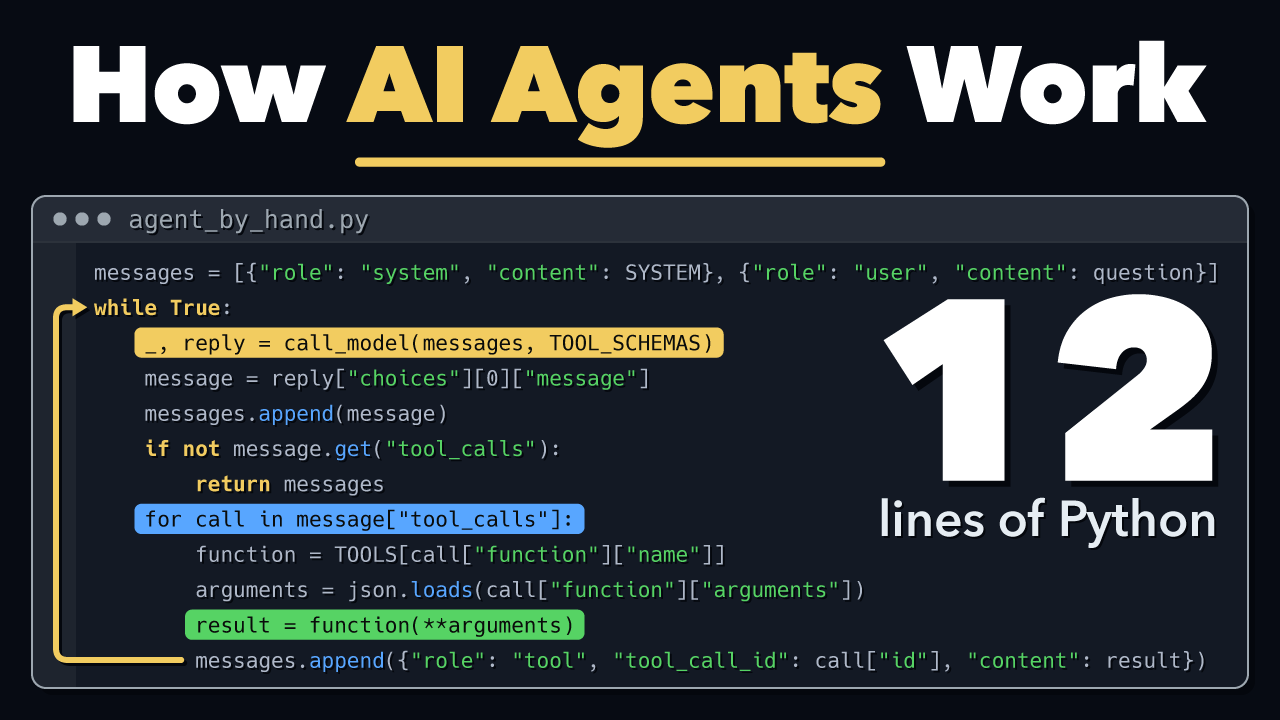
The exercise for my video How AI Agents Actually Work: Build One From Scratch
You need Git and Docker (start Docker Desktop first, or the Docker service on Linux) and about 4 GB of free disk space. Nothing else: no Python on your computer, no account and no key. Run the commands in a terminal: Terminal on a Mac, your shell on Linux, and on Windows a WSL terminal, such as Ubuntu, with Docker Desktop's WSL integration turned on. On Linux, add your user to the docker group first, as Docker's install guide shows: the script that kills the agent runs docker itself.
The model here is the scripted stand-in from the video's long runs: a few rules in a container, not a real model. It gets what a model gets, the messages and the tools on offer, and answers in the same format, so the agent's code can't tell the difference. That's why you need no account and no key, and why you get the video's numbers.
The kills from the video: what you see in steps 3 and 4, and in the extra
it starts over at invoice 1: 51 payments for 33 invoices
it carries on from invoice 23: 33 payments for 33 invoices
invoice 1039 is paid twice
the tool runs twice and writes once
1. Start the lab
Get the lab from my tutorials repository on GitHub, and start it:
git clone --depth 1 --branch main https://github.com/antonputra/tutorials.git
cd tutorials/lessons/285/lab
docker compose up -d --build --wait
The first start builds the lab's image: it downloads Python, Postgres with pgvector, and the Python packages, LangChain, LangGraph and Deep Agents among them, so give it a few minutes. When the command returns, everything is ready: Postgres with the data of Juniper Market, the small grocery store from the video, the scripted model, and a container named lab, where the agent runs. No port is published.
The data is the video's: 40 supplier invoices, numbers 1031 to 1070, all due on Friday, November 27, 2026. docker compose exec -T lab in front of a command runs it in the lab container.
2. Ask about one invoice
The agent from the start of the video is the loop of twelve lines in agent_by_hand.py, with no library: it sends the conversation to the model, runs the tool the model asks for, and sends the result back, until the model stops asking. Ask it about invoice 1042:
system       You are the payables agent of Juniper Market, a grocery store in Bend, Oregon. You check supplier invoices against purchase orders.
user         Is invoice 1042 from Cascade Packaging correct? Check it against its purchase order.
model asks   get_invoice({"invoice_number": 1042})
we answer    4,302 characters: {"invoice_number": 1042, "supplier": "Cascade Packaging", "po_number": "PO-2207", "invoice_date": "2026-10-28"...
model asks   get_purchase_order({"po_number": "PO-2207"})
we answer    780 characters: {"po_number": "PO-2207", "supplier": "Cascade Packaging", "order_date": "2026-10-18", "status": "received", "l...
assistant    Invoice 1042 from Cascade Packaging does not match PO-2207: it bills 55 cases of 12 oz paper cups (case of 1,000) at $38.00; PO-2207 ordered 50: overbilled by $190.00; freight line of $60.00 is not on PO-2207.

3 requests to the model, 2 tool calls run by our code
Three requests, two tools. The model only asks; our code reads the database. The Friday payment run is the same loop over all 40 invoices, with three more tools: one lists the invoices that are due, one schedules a payment, and one puts an invoice on hold.
3. Kill it, with nothing saved
Now the whole Friday run, with each invoice handed to a helper, as in the video. This version keeps everything in the memory of its own process and saves nothing. Start it in a container of its own, with the model slowed down to half a second a reply, so the kill lands where we want it:
docker compose exec -T lab python -m seed.seed --reset-activity
docker compose exec -T lab python -m app.control s5-nosave-first
docker compose run -d --name payrun-n lab python steps.py s5-nosave first 500 helpers
The first line empties the payments and the holds, so every run starts from the same data. The second empties the model's request log: the kill below counts the requests in it. The third prints the new container's ID. Now kill it in the middle of invoice 23:
tools/kill-when.sh payrun-n 114 'docker exec juniper-lab-fake-model-1 sh -c "ls /logs/s5-nosave-first 2>/dev/null | grep -c request; true"'
docker rm payrun-n
18:47:47 count is 114: docker kill payrun-n
container /payrun-n: exited, exit code 137, finished 2026-11-24T18:47:47.458988372Z
payrun-n
kill-when.sh counts the requests in the model's log, with docker exec, quicker than docker compose exec. At 114, about a minute in, it kills the container with SIGKILL, exit code 137: a crash, not a clean stop. The last line removes the stopped container. payments.sql asks Postgres how many payments there are, for how many invoices, and which invoices were paid more than once:
 payments | invoices | total_usd
----------+----------+-----------
       18 |       18 |  81306.50
(1 row)

 invoice_number | payments | total_usd
----------------+----------+-----------
(0 rows)
18 payments when it died, as in the video. Start it again:
[scripted model: request log /logs/s5-nosave-again, 0 ms before each reply]
no checkpointer: nothing of this run is saved outside this process
164 messages in the conversation

Payment run for invoices due 2026-11-27: 40 invoices checked.
Scheduled 33 payments, $151,275.00 in total.
Put 7 invoices on hold:
- 1034: freight line of $45.00 is not on PO-2199
- 1042: it bills 55 cases of 12 oz paper cups (case of 1,000) at $38.00; PO-2207 ordered 50: overbilled by $190.00; freight line of $60.00 is not on PO-2207
- 1049: unit price $39.75 for Strawberry jam, 10 oz (case of 12); PO-2214 says $39.00: overbilled by $6.00
- 1051: freight line of $75.00 is not on PO-2216
- 1058: duplicate of invoice 1037: same supplier, PO-2202 and $2,884.00
- 1063: no purchase order for a total of $2,008.00
- 1066: freight line of $52.50 is not on PO-2231
It doesn't know it ran before: it asked for the invoices again and began at invoice 1031, the first one. Look at the payments now:
 payments | invoices | total_usd
----------+----------+-----------
       51 |       33 | 232581.50
(1 row)

 invoice_number | payments | total_usd
----------------+----------+-----------
           1031 |        2 |   5310.00
           1032 |        2 |   6280.00
           1033 |        2 |  21124.00
           1035 |        2 |  12419.00
           1036 |        2 |   5697.00
           1037 |        2 |   5768.00
           1038 |        2 |   5333.00
           1039 |        2 |  11442.00
           1040 |        2 |   2745.00
           1041 |        2 |  15797.00
           1043 |        2 |   3188.00
           1044 |        2 |  10353.00
           1045 |        2 |   5820.00
           1046 |        2 |  16488.00
           1047 |        2 |   6443.00
           1048 |        2 |  11885.00
           1050 |        2 |   8101.00
           1052 |        2 |   8420.00
(18 rows)
51 payments for 33 invoices: the 18 paid before the kill are paid again, $232,581.50 where $151,275.00 was due. The list of invoices it got back even says that those 18 are scheduled. The scripted model doesn't read that, so it pays them again. A real model may notice, or may not: nothing in the agent stops it.
4. Kill it, with every step saved
The same agent, with saved steps on: LangGraph saves the run in Postgres after every step, under the run's name, here friday. Start it, and kill it in the same place:
docker compose exec -T lab python -m seed.seed --reset-activity
docker compose exec -T lab python -m app.control s8-friday
docker compose run -d --name payrun-s lab python steps.py s8-delegate friday 500
tools/kill-when.sh payrun-s 114 'docker exec juniper-lab-fake-model-1 sh -c "ls /logs/s8-friday 2>/dev/null | grep -c request; true"'
docker rm payrun-s
Start it again, with the same name:
[scripted model: request log /logs/s8-friday, 0 ms before each reply]
thread friday: unfinished work found in Postgres: 92 messages saved, next node ('tools',)
last saved message: ai asks task({'description': 'Check invoice 1053 against its purchase order. Reply with one line: PAY <invoice number> <amount> <short note>, or HOLD <invoice number> <reason>.', 'subagent_type': 'invoice-checker'})
resuming with invoke(None, config): no new input
164 messages in the conversation

Payment run for invoices due 2026-11-27: 40 invoices checked.
Scheduled 33 payments, $151,275.00 in total.
Put 7 invoices on hold:
- 1034: freight line of $45.00 is not on PO-2199
- 1042: it bills 55 cases of 12 oz paper cups (case of 1,000) at $38.00; PO-2207 ordered 50: overbilled by $190.00; freight line of $60.00 is not on PO-2207
- 1049: unit price $39.75 for Strawberry jam, 10 oz (case of 12); PO-2214 says $39.00: overbilled by $6.00
- 1051: freight line of $75.00 is not on PO-2216
- 1058: duplicate of invoice 1037: same supplier, PO-2202 and $2,884.00
- 1063: no purchase order for a total of $2,008.00
- 1066: freight line of $52.50 is not on PO-2231
92 messages saved, and the next stop is the tools: our agent had just handed invoice 1053, number 23, to a helper. It carries on from there, and so does the helper, from its own last saved step. Check the payments:
 payments | invoices | total_usd
----------+----------+-----------
       33 |       33 | 151275.00
(1 row)

 invoice_number | payments | total_usd
----------------+----------+-----------
(0 rows)
33 payments for 33 invoices. So what ran twice? Compare the request the model got just before the kill with the first one after it:
request 114: 13,926 characters, sha256 4d77c65db276776e87ed881faa048d52c02b2bb596ad74d5c8fbf8ba35a611dd
request 115: 13,926 characters, sha256 4d77c65db276776e87ed881faa048d52c02b2bb596ad74d5c8fbf8ba35a611dd
the two request bodies are identical
One request to the model, sent again byte for byte: its answer was lost in the kill. No tool ran twice. If kill-when.sh said count is 115, compare 115 and 116.
Extra: the worst moment to die
Saved steps have one gap. Kill the agent inside the payment tool, after the payment's row is written and before the step is saved. PAYMENT_CONFIRM_SECONDS=2 makes the tool wait two seconds after its write, so the kill lands in that gap. This time kill-when.sh counts the rows in the payments table, and kills the agent at the 8th payment, for invoice 1039. The last line starts it again:
docker compose exec -T lab python -m seed.seed --reset-activity
docker compose run -d --name payrun-t -e PAYMENT_CONFIRM_SECONDS=2 lab python steps.py s8-delegate friday-t
tools/kill-when.sh payrun-t 8 'docker compose exec -T postgres psql -U postgres -d juniper -Atc "select count(*) from payments"'
docker rm payrun-t
docker compose exec -T lab python steps.py s8-delegate friday-t
Its last saved step asks for schedule_payment for invoice 1039, so it runs the tool again, and its summary still says 33 payments. Check the payments:
 payments | invoices | total_usd
----------+----------+-----------
       34 |       33 | 156996.00
(1 row)

 invoice_number | payments | total_usd
----------------+----------+-----------
           1039 |        2 |  11442.00
(1 row)
Invoice 1039 is $5,721.00, paid twice. And the model has no idea: its conversation has one payment for it. A saved step is not a finished action, and the fix is in the tool. PAYMENTS_IDEMPOTENT=1 gives each payment a key, and the tool looks for that key before it writes. The same kill again:
docker compose exec -T lab python -m seed.seed --reset-activity
docker compose run -d --name payrun-u -e PAYMENT_CONFIRM_SECONDS=2 -e PAYMENTS_IDEMPOTENT=1 lab python steps.py s8-delegate friday-u
tools/kill-when.sh payrun-u 8 'docker compose exec -T postgres psql -U postgres -d juniper -Atc "select count(*) from payments"'
docker rm payrun-u
docker compose exec -T -e PAYMENTS_IDEMPOTENT=1 lab python steps.py s8-delegate friday-u
docker compose exec -T postgres psql -U postgres -d juniper < sql/payments.sql
 payments | invoices | total_usd
----------+----------+-----------
       33 |       33 | 151275.00
(1 row)

 invoice_number | payments | total_usd
----------------+----------+-----------
(0 rows)
The tool ran twice for invoice 1039, and wrote once.
5. Clean up
It removes the lab's containers, its three volumes and the image it built. Then you can delete the tutorials folder: cd ../../../.. && rm -rf tutorials.
The results
| The Friday run | Payments | For invoices | Paid |
|---|---|---|---|
| What was due | 33 | 33 | $151,275.00 |
| Killed in invoice 23, nothing saved | 51 | 33 | $232,581.50 |
| Killed in invoice 23, every step saved | 33 | 33 | $151,275.00 |
| Killed inside the payment for invoice 1039 | 34 | 33 | $156,996.00 |
| The same, with a key on each payment | 33 | 33 | $151,275.00 |
The full lab
In the video, the agent is built one part at a time, and each part comes in when the agent breaks without it: tools, the loop, a workspace, helpers, saved steps, a person who approves, memory, the policy in a vector table, and a second agent. The full lab runs every one of those steps on this same lab, mission by mission.
Free. Unsubscribe anytime. Form not loading? Subscribe here.